SA insurance panels (Santam, OUTsurance, Telesure) require contractors to maintain 95%+ SLA compliance (60-minute emergency response, 4-hour standard), GPS proof of attendance within 40 metres of the job address, DAS claim reference numbers on every job, and COC certificates for electrical, plumbing and gas work.
Insurance panel status = 60–70% of contractor revenue for most SA trade contractors. Losing it is catastrophic. This guide covers exactly what SA’s major insurance panels require, what the breach consequences are, and how to maintain preferred contractor status.
- SLA Compliance: 60-min emergency response, 4-hour standard (maintain 95%+)
- GPS Proof: Timestamp + location verification within 40m of address
- DAS Tracking: Claim reference number (Digicall or panel-specific)
- COC Documentation: Certificates of Compliance for electrical/plumbing/gas
- Reporting: Minimum 5 photos, detailed findings, recommendations
- Comeback Rate: Below 8% — above 15% is suspension risk
The Major SA Insurance Panels
The Big Four Groups
- Santam — Largest short-term insurer in SA. Primary DAS: Digicall. Strictest compliance requirements. Panel volume: very high. SLA: 60-min emergency, 4-hour standard.
- OUTsurance (Rand Merchant Insurance) — Major direct insurer. DAS: In-house + Digicall. Fast claim processing. SLA: 60-min emergency, 4-hour standard.
- Telesure Group — Covers Budget Insurance, 1st for Women, Auto & General, Virseker. Combined market power. SLA: 60-min emergency, 4-hour standard.
- Old Mutual Insure — Includes iWYZE, Mutual & Federal. Mid-tier volume.
Mid-Tier and Growing Panels
- King Price — Growing fastest, competitive rates, increasing job volume
- MiWay — Established player with steady volume
- Discovery Insure — Newer, growing rapidly, competitive rates for contractors
- Hollard — Commercial focus, different job profile
SLA Requirements In Detail
SLA (Service Level Agreement) is the maximum time allowed from claim assignment to contractor arrival at the job site. Not from when the customer calls — from when DAS assigns the job to you.
Emergency SLA: 60 Minutes
- Geyser burst (water damage actively occurring)
- Electrical fault (no power, vulnerable occupants)
- Gas leak (safety hazard, evacuation required)
- Roof leak during active rain (structural threat)
- Flooding from burst pipe (damage escalating)
Standard SLA: 4 Hours
- Geyser not heating (cold water, no burst)
- Non-critical electrical fault (single circuit, no safety risk)
- Blocked drain (inconvenience, not flooding)
- Door lock repair (security but not emergency)
- Non-urgent geyser thermostat fault
How SLA Is Measured and What Counts as Arrival
The SLA clock starts when DAS assigns the claim to you — typically 5–15 minutes after the customer calls. Your job is to be on site within 60 minutes (emergency) or 4 hours (standard) of that assignment timestamp.
What does NOT count as arrival: Phone call saying “I’m on my way”, being in the general area, parking outside the property.
What DOES count as arrival: GPS check-in within 40 metres of the job address, with timestamp. This is non-negotiable. No physical GPS proof = no SLA compliance credit.
SLA Performance Thresholds
| SLA Rate | Status | Insurer Response |
|---|---|---|
| 95–100% | Excellent | Preferred contractor, increased job allocation |
| 90–94% | Good | Maintained status, no concerns |
| 85–89% | Warning zone | Informal notice, review likely |
| 80–84% | Formal warning | Written warning, improvement plan required |
| 75–79% | Probation | Formal action plan, reduced job allocation |
| <75% | Removal | Contract termination |
My experience: At 87% SLA compliance (using Tradify with manual tracking), I received a formal warning letter from OUTsurance. I was 2 percentage points from probation. If I hadn't switched systems and rebuilt my compliance process, I would have lost 40% of my annual revenue. PlanMyCrew automated SLA tracking took me from 87% to 98.3% within 6 weeks.
DAS Systems — Digicall and Others
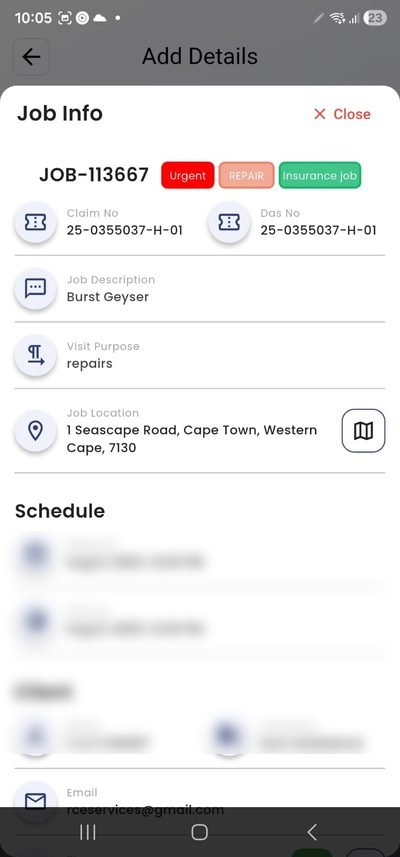
DAS (Damage Assessment Service) is the third-party service that manages claim flow between insurer and contractor. Digicall is the most widely used DAS provider in SA, handling claims for Santam and OUTsurance primarily.
The Digicall Workflow
- Customer contacts insurer, reports damage claim
- Insurer logs claim, passes to Digicall for contractor assignment
- Digicall assigns to nearest available contractor — SLA clock starts here
- You receive SMS/app notification: “New claim DIG-2026-045123”
- You must accept within 5 minutes or claim is reassigned to another contractor
- Assign to your nearest available team
- Team GPS check-in on arrival (40m verified)
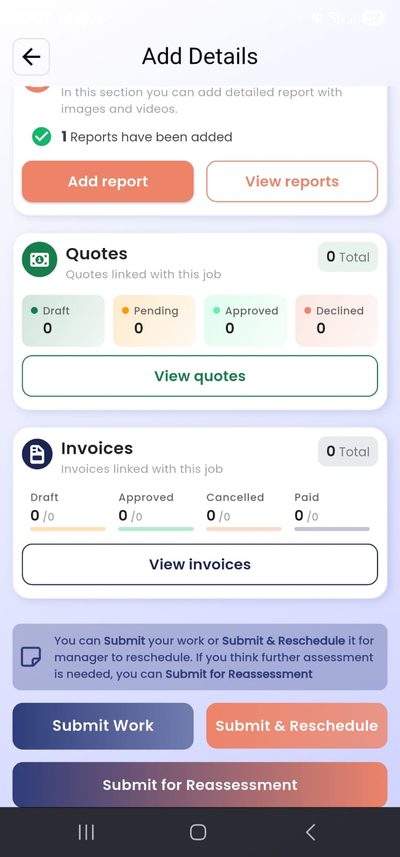
- Work completed, photos uploaded (minimum 5), COC attached if required, client signs digitally
- Digicall validates completion
- Insurer processes payment (30–45 days typical)
The DAS claim reference number (e.g., DIG-2026-045123) must appear on every job record, job card, and invoice. Without this reference, the claim cannot be processed and payment is delayed or refused.
COC Requirements (Certificates of Compliance)
Certificate of Compliance confirms that work meets South African National Standards (SANS) regulations. Without it where required, the insurance claim is rejected.
When COC Is Always Required
- Electrical: DB board work, new circuits, earth leakage installation — always required
- Plumbing: Geyser installation or replacement, water mains work — always required
- Gas: Any gas geyser, stove connection, LPG cylinder, gas pipe work — always required
When COC May Not Be Required
- Electrical: Single breaker replacement, light fitting installation (depends on insurer)
- Plumbing: Tap washer replacement, toilet mechanism repair (not replacement)
When in doubt, attach the COC. A rejected claim from missing documentation costs more than the time to get the certificate.
Professional Reporting Requirements
Insurance panels require professional documentation for every job. What “professional documentation” means in practice:
- Photos: Minimum 5 per job — before work, during work (2–3), after completion, materials used
- Client signature: Digital signature confirming work completion (not just verbal agreement)
- Materials list: Specific items used with quantities (not just “fittings and supplies”)
- Findings description: What was wrong, what was done, what was replaced
- COC attachment: Where required (see above)
- DAS reference: Claim number on every document
How to Apply for Insurance Panel Status
Getting onto an insurance panel provides consistent, predictable job flow from insurers rather than depending entirely on word-of-mouth. Here’s the application process.
Direct Insurer vs DAS Application
- Direct insurer application: Apply to Santam, OUTsurance or Telesure directly. Process time: 6–12 weeks. Requirements: full compliance documents plus references.
- DAS application via Digicall: Apply to Digicall directly. Approval can unlock multiple insurer panels simultaneously. Process time: 4–8 weeks. More efficient for most new contractors.
The Vetting Process
Panel vetting is thorough. Expect document verification (PIRB, insurance certificates, company registration, tax clearance), reference checks (panel coordinators contact your commercial references directly), a skills assessment or test jobs at reduced rates, and in some cases a site visit to your depot or office.
Common Rejection Reasons
- Incomplete documentation — any missing certificate stops the application immediately
- PIRB registration lapsed or not current
- Insurance coverage below minimum threshold (R5M public liability minimum, some panels require R10M)
- Insufficient commercial work references (residential references are lower value)
- Panel capacity full in your area — some panels are not accepting new contractors regardless of qualification
Maintaining Preferred Contractor Status
Basic panel status keeps you on the contractor list. Preferred contractor status gets you priority job allocation — more jobs, more consistently, with better rates. The difference in annual revenue between basic and preferred status on a major panel can be R500,000–1,500,000 depending on your capacity.
What separates preferred contractors from basic status:
- SLA compliance 98%+ (not just 95%): the top tier for job allocation
- Comeback rate below 3% (not just below 8%): insurers track this carefully
- Professional documentation submitted correctly and promptly on every job, every time
- Jobs accepted within 2 minutes of DAS assignment (not 5): faster response = more allocation
What Triggers Performance Reviews
Insurance panels monitor continuously and act on trigger events — not just at annual review:
- SLA compliance drop below 90%: automatic flag, informal review
- Three consecutive SLA breaches: immediate review regardless of overall rate
- Customer complaint submitted to insurer: investigation triggered immediately
- Comeback rate above 8% in any month: review triggered
- Missing documentation on multiple jobs: quality review triggered
Most contractors who receive warning letters are surprised — they weren’t monitoring the right metrics. PlanMyCrew tracks all these metrics automatically so you know your standing before the panel coordinator does. See how PMC manages insurance panel compliance →
Managing Multiple Panels Simultaneously
Most established SA trade contractors work 3–5 panels simultaneously (Santam, OUTsurance, Telesure brands, King Price, MiWay). The administrative challenge: each panel has its own DAS system, SLA configuration, documentation requirements, and payment cycle.
PlanMyCrew handles multi-panel management by treating each panel as a separate job source with its own requirements applied automatically. When a Digicall email arrives, it’s parsed and tagged as a Santam-sourced job with Santam SLA requirements. When a Telesure job arrives, Telesure requirements apply automatically. No manual configuration per job needed. See multi-panel management features →
Pricing for PlanMyCrew
PlanMyCrew starts at R149/month for solo contractors (up to 5 crew). The Panel Pro plan at R350/user/month includes all insurance panel features: SLA tracking, Digicall email parsing, GPS enforcement, COC library, and panel-compliant reporting. Business plan at R750/user/month adds job costing, custom SLA workflows and a dedicated account manager.
All plans include a 30-day free trial with no credit card required. See full pricing →
Software That Helps vs Software That Doesn’t
| Feature | PlanMyCrew | ServCraft | Tradify | Eworks |
|---|---|---|---|---|
| SLA countdown timers | ✓ Automatic | ✕ Manual | ✕ Manual | ✕ Manual |
| DAS reference tracking | ✓ Required field | ✕ | ✕ | ✕ |
| GPS 40m enforcement | ✓ Enforced | ✕ Trust-based | ✕ Basic | ✕ Tracking |
| COC library auto-attach | ✓ Automatic | ⚠ Manual | ⚠ Manual | ⚠ Manual |
| Insurance-compliant reports | ✓ Templates | ✕ Generic | ✕ Generic | ✕ Generic |
| Digicall email parsing | ✓ Automatic | ✕ | ✕ | ✕ |
Getting Started: Panel Application Checklist
To apply for insurance panel status:
- PIRB registration (Professional Indemnity Requirements Board) — electrician, plumber, or gas fitter as applicable
- Public liability insurance: minimum R5,000,000 coverage
- Professional indemnity insurance
- Registered company (Pty Ltd or CC)
- Bank account in company name + tax clearance certificate
- Work history references (3+ commercial clients preferred)
- Evidence of GPS tracking capability (panels increasingly require this)
Maintaining Panel Status: Ongoing Requirements
- 95%+ SLA compliance (target 98%+ for preferred status and increased job allocation)
- GPS proof on every job (40m verified timestamp)
- DAS claim reference numbers on every job record
- COCs attached where required
- Professional photos: minimum 5 per job, consistent quality
- Comeback rate below 8%
- Accept jobs within 5 minutes of DAS assignment (delayed acceptance reduces allocation)
- Responsive communication with customers and panel coordinators
Purpose-Built for SA Insurance Panel Contractors
SLA countdown timers, DAS tracking, GPS enforcement and panel-compliant reports. Built for Santam, OUTsurance, Telesure. 30-day free trial.