To achieve 95%+ SLA compliance on SA insurance panels, assign teams to defined geographic zones, maintain standby capacity during peak periods, and use automated SLA monitoring software that alerts you before breach. Manual Excel tracking fails at scale. PlanMyCrew automates SLA countdown timers from Digicall dispatch emails.
A 60-minute emergency SLA sounds generous. Until you do the maths: DAS assignment time (5–15 min), your team’s response time (2–5 min), travel time in Cape Town or Johannesburg peak traffic (30–45 min), plus GPS check-in. You have 30–40 minutes of actual travel window. Here’s how to achieve 95%+ SLA compliance reliably across multiple teams.
- Target: 95%+ (excellent), 90%+ (acceptable), below 85% = warning risk
- My result: 98.3% (2025, 10 teams across 3 provinces)
- Top strategies: Geographic zone coverage, automated monitoring, standby capacity
- Biggest mistake: No standby team during high-volume periods (winter geyser season)
Why SLA Compliance Is Hard to Achieve Consistently
Most contractors who struggle with SLA compliance have one of three problems:
- Geography: Teams covering areas that are too large — any job at the far end of their zone is already at-risk before they start driving
- Capacity: Not enough teams for job volume, particularly during winter peaks when geyser work surges
- Visibility: No real-time view of which jobs are approaching breach — relying on Excel or memory
The contractors achieving 98%+ SLA compliance have solved all three.
Strategy 1: Geographic Zone Coverage
The single highest-impact change you can make for SLA compliance is assigning teams to defined geographic zones rather than the entire metro. If your Cape Town teams cover “Cape Town”, any job in the far northern suburbs from a team starting in Fish Hoek is already potentially at breach before they leave the depot.
Zone structure example for Cape Town:
- Zone 1: Southern Suburbs + CBD + Atlantic Seaboard (Team A primary)
- Zone 2: Northern Suburbs (Bellville, Parow, Goodwood) (Team B primary)
- Zone 3: Winelands + Stellenbosch (Team C primary)
- Zone 4: South Peninsula (Simonstown, Fish Hoek) (Team D primary)
Each zone has a primary team and a secondary team (the nearest adjacent zone team). Jobs within primary zone: 95%+ SLA achievement rate. Cross-zone only when primary team unavailable and only if realistic travel time exists.
Strategy 2: Always Have a Standby Team
In high-volume periods — particularly winter when geyser work surges 40–60% above baseline — every team is active. A new emergency job arrives and there is no available team. The job is assigned but the team won’t be free for 90 minutes. SLA breach is inevitable.
The solution: designate a standby team during peak periods. In practice, this means:
- One team starts their day 30 minutes later than others, keeping their morning open for emergency callouts
- During winter (June–August): full standby team from 7am–12pm when most geyser emergencies occur
- During the rest of the year: rolling standby based on current workload
Strategy 3: Automated SLA Monitoring
Manual SLA tracking fails at scale. With 20+ active jobs across 3 provinces, you cannot manually monitor every SLA deadline. You need software that:
- Automatically sets the SLA deadline when the job is created from the dispatch email
- Sends push notification alerts at configurable intervals before breach (I use 50% and 85% thresholds)
- Escalates automatically to you if no action taken when a job hits 85% of its SLA time
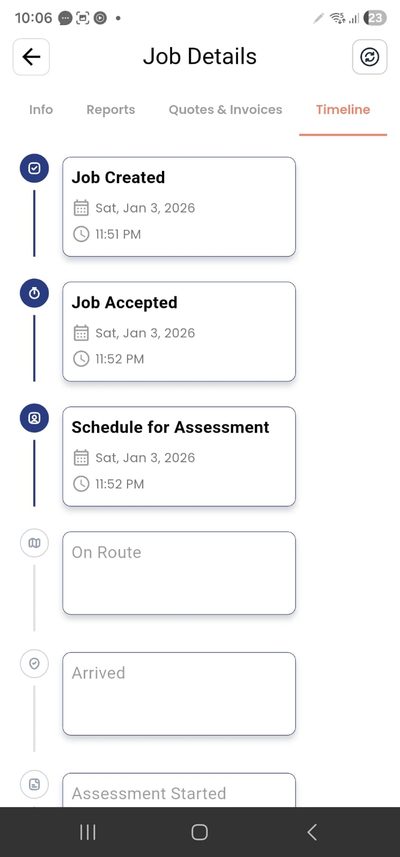
- Shows a real-time dashboard of all active jobs colour-coded by SLA risk
PlanMyCrew does all of this automatically from the moment the Digicall email is parsed. ServCraft, Tradify and Eworks require you to manually set deadlines and manually track them — which means human error and missed deadlines as volume increases. See how PMC’s SLA tracking works →
Managing SLA compliance across multiple crews requires a central dashboard. PlanMyCrew's contractor management platform shows every active job, SLA countdown, and crew location across all provinces in real time.
Strategy 4: Traffic Buffer Planning
Never plan travel based on Google Maps “best route” times for peak-hour assignments. Plan based on realistic peak-hour travel times:
- Cape Town N1 northbound (7–9am): Add 30–40 minutes for any northern suburbs job
- Cape Town N2 (afternoon): Add 20–30 minutes for southern suburbs and airport area
- Johannesburg N1/M1 (morning and evening): Add 45–60 minutes for any cross-town journey
- Durban N2 (any time): Traffic unpredictable, add 20 minutes minimum
The rule of thumb: If Google Maps says 30 minutes, plan for 50 minutes during peak hours. If you can’t make the SLA with that buffer, don’t accept the job — or get a closer team.
Strategy 5: Material Pre-Stocking for Common Jobs
A team that arrives within the SLA but has to leave to get parts has technically met the time requirement but has failed the customer and will likely generate a comeback. Stock common materials in every van:
- Electrical: Assorted breakers (15A, 20A, 30A, 40A), earth leakage units, standard fittings, cable (2.5mm and 4mm)
- Plumbing: Geyser elements (1.5kW, 2kW, 3kW), thermostats, flexible hose (various lengths), pressure control valves, standard fittings
- General: Common tap washers, basic DPC, silicone, Teflon tape
Review monthly: what parts are your teams running back to the warehouse for most often? Stock those. The material cost is trivial compared to the SLA breach cost.
The 60-Minute SLA in Practice: Real-World Time Breakdown
Most contractors who miss the 60-minute SLA deadline don’t understand how little travel time they actually have. Here is the real-world breakdown:
- Customer calls insurer: 0 minutes (your time starts here for context, not SLA)
- Insurer processes claim, sends to DAS: 10–20 minutes
- DAS assigns to contractor (SLA clock starts): 5–10 minutes after insurer submission
- Your response time (read notification, assign team): 2–5 minutes
- Team finishing current task, preparing to leave: 3–8 minutes
- Travel to site: 25–40 minutes (realistic SA traffic)
- Parking, walking to door, GPS check-in: 3–5 minutes
Total: 48–88 minutes. The 60-minute SLA is only consistently achievable if your team has zero wasted time at every step and the job site is within 25 minutes of their current location. That is why geographic zone coverage and standby capacity are not optional — they are structural requirements.
SLA Compliance During Load Shedding
Load shedding creates specific SLA compliance challenges that no international software has ever had to consider:
- Your technician may be in an area with active load shedding when the job is assigned — traffic lights not working, navigation apps slow to load
- Cloud-dependent software goes offline during load shedding, meaning job details are inaccessible when the technician needs them most
- Customer properties may have gate motors that won’t open, adding 5–10 minutes to site access
- Insurer systems sometimes have load shedding-related delays in DAS assignment, eating into your SLA window
Mitigation strategies:
- Offline-first mobile app (PMC) ensures job details are available regardless of connectivity
- Pre-loaded navigation routes for common areas (downloaded maps, not live navigation)
- Standard customer message when departing: “Please open your gate manually — we will be there in approximately X minutes”
- Add 10 minutes to your SLA buffer calculation during load shedding periods
SLA Performance by Job Type: Where Most Contractors Lose Points
Not all SLA misses are equal in their causes. Analysing your SLA data by job type reveals where to focus improvement efforts:
Geyser Emergencies (Highest Volume, Highest Risk)
Geyser burst emergencies represent the majority of 60-minute SLA assignments for most plumbing and electrical contractors. They’re also the highest SLA miss category because they cluster in winter mornings (7–9am) when traffic is worst and every available team is already deployed.
Specific strategies for geyser emergencies:
- Pre-position one team in the residential density zone with highest geyser age concentration (typically older suburbs with 20–40 year housing stock)
- During June–August, dedicate one vehicle purely to emergency response — no scheduled work
- Pre-stock every vehicle with the 3 most common geyser elements and pressure valves so no trip to the warehouse is needed
Electrical Faults (Lower Volume, But Critical)
Electrical emergencies (no power to the property) often have access complications: the DB board is locked, the property manager must be contacted, the customer is at work. These logistical delays happen after your team arrives and after the SLA clock has stopped — but they affect your ability to complete the job and generate comebacks.
Building a SLA Recovery Plan
When your SLA compliance drops in a given month, you need a structured recovery plan rather than just hoping next month is better.
Identify the Root Cause
Pull your SLA data for the month (PMC generates this automatically). Sort breaches by:
- Time of day: 80% in morning rush hours? Staffing timing issue
- Day of week: Mostly Mondays? Weekend standby coverage gap
- Geographic area: All in one suburb? Zone coverage problem
- Team member: One technician responsible for 60% of breaches? Performance issue or zone assignment issue
Make One Change at a Time
Don’t change zone coverage, staffing levels, and standby protocols simultaneously. You won’t know which change improved performance. Make one structural change, measure for 4 weeks, assess impact, then make the next change.
Communicate with Your Panel Coordinator
If your SLA compliance drops in a given month for identifiable reasons (unusual weather event, vehicle breakdown, staff illness), communicate proactively with your panel coordinator before they send you a warning letter. “We had two vehicles out of service simultaneously in the first week of August which affected our northern suburbs coverage. We’ve resolved the situation and our September compliance is tracking at 97%.” This kind of proactive communication often prevents a formal warning being issued.
SLA Compliance as a Competitive Advantage
Most contractors see SLA compliance as a defensive metric — something to maintain to avoid losing panel status. The top 10% of SA panel contractors see it as an offensive metric — a way to get significantly more job allocation than competitors.
When a panel coordinator is allocating emergency jobs at 7am and has two available contractors — one with 96% SLA compliance and one with 92% — the 96% contractor gets the job. Not occasionally. Every time.
Over a month with 200 emergency job assignments, a 4% compliance advantage translates to approximately 8 more jobs allocated to the higher-performing contractor. At R2,000 average job value, that’s R16,000/month in additional revenue from SLA compliance advantage. R192,000/year.
SLA compliance at 98%+ is not just about not getting a warning letter. It’s about maximising job allocation and revenue from the panel work that represents 60–70% of your revenue base. See the full insurance panel requirements guide →
Tools and Technology for SLA Management
Beyond the field service management software, here are additional tools that support SLA compliance:
- Google Maps real-time traffic: For dispatchers assigning jobs manually, always check real-time traffic before confirming team assignment
- WhatsApp Business: For direct customer communication confirming arrival times and managing expectations
- Waze: Faster than Google Maps for route planning in SA traffic conditions, particularly in Johannesburg
- PlanMyCrew (from R149/month, Panel Pro R350/user): SLA dashboard with Real-time countdown on all active jobs, colour-coded by risk, accessible from any device including during load shedding (offline sync)
What to Do When You’re About to Miss an SLA
Sometimes it’s unavoidable — accident on the N1, vehicle breakdown, team running late from a complex job. When you know you’re going to breach, these steps minimise the impact:
- Contact DAS/panel immediately — proactive communication prevents automatic penalties in many cases
- Provide a realistic, specific ETA — “We will arrive at 11:35” not “soon”
- Document the reason (accident reference number, breakdown photos) — evidenced force majeure can sometimes prevent the SLA mark being recorded
- Dispatch second team if one is available even marginally closer
- Contact the customer directly — a pre-warned customer rarely escalates the complaint
Monthly SLA Review Process
Check SLA performance monthly. Monthly reviews catch downward trends before they become warning letters. What to review:
- Overall SLA percentage for the month vs previous months
- SLA by zone/area: which geographic areas are causing breaches?
- SLA by job type: emergency vs standard — where are the failures concentrated?
- SLA by team member: which technicians are consistently late to site?
- Pattern analysis: is it always Monday mornings? Rainy days? Specific industrial areas with traffic?
The patterns reveal the fixes. If 70% of your breaches are in the northern suburbs on weekday mornings, the answer is either a dedicated northern suburbs team or adjusting your standby team’s position.
Achieve 98%+ SLA Compliance with Automated Tracking
PlanMyCrew tracks every SLA deadline automatically. Alerts before breach, escalation if needed, real-time dashboard across all provinces. 30-day free trial.